# `Emerge.UI.Size`
[🔗](https://github.com/emerge-elixir/emerge/blob/v0.3.4/lib/emerge/ui/size.ex#L1)
Length and sizing helpers for Emerge UI layouts.
`Emerge.UI.Size` provides the common vocabulary for sizing elements in rows,
columns, and generic containers.
Use these helpers through `width/1` and `height/1`.
## Length Kinds
The main length helpers are:
- `px(n)` for a fixed pixel size
- `fill()` for taking remaining space
- `fill(n)` for weighted remaining-space distribution
- `shrink()` for sizing to content
- `content()` as an alias for `shrink()`
`fill()` is visible inside layouts that distribute space between siblings,
such as `row/2` and `column/2`.
`fill(2)` does not mean 2 pixels. It means "take 2 shares of the remaining
space". If a sibling uses `fill(1)`, the `fill(2)` element gets twice as much
of the leftover room.
## Min and Max
`min/2` and `max/2` combine two lengths mathematically:
- `max(px(140), shrink())` means "size to content, but never below 140px"
- `min(px(180), fill())` means "fill remaining space, but never above 180px"
- `min(content(), fill())` means "content-sized until the available fill slot
is smaller"
## Examples
A fixed-width panel:
This is the most direct sizing mode: the panel is always `220px` wide.
```elixir
el(
[
width(px(220)),
padding(12),
Background.color(color(:slate, 900)),
Border.rounded(10),
Font.color(color(:slate, 50))
],
text("Fixed panel")
)
```
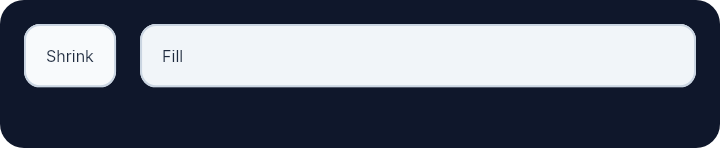
 Shrink next to fill:
The first child stays only as wide as its content, while the second child
expands to take the remaining room in the row.
```elixir
row(
[
width(fill()),
height(fill()),
padding(12),
spacing(12),
Background.color(color(:slate, 900)),
Border.rounded(12)
],
[
el(
[
width(shrink()),
padding(10),
Background.color(color(:slate, 50)),
Border.rounded(8),
Border.width(1),
Border.color(color(:slate, 300)),
Font.color(color(:slate, 800))
],
text("Shrink")
),
el(
[
width(fill()),
padding(10),
Background.color(color(:slate, 100)),
Border.rounded(8),
Border.width(1),
Border.color(color(:slate, 300)),
Font.color(color(:slate, 800))
],
text("Fill")
)
]
)
```
Shrink next to fill:
The first child stays only as wide as its content, while the second child
expands to take the remaining room in the row.
```elixir
row(
[
width(fill()),
height(fill()),
padding(12),
spacing(12),
Background.color(color(:slate, 900)),
Border.rounded(12)
],
[
el(
[
width(shrink()),
padding(10),
Background.color(color(:slate, 50)),
Border.rounded(8),
Border.width(1),
Border.color(color(:slate, 300)),
Font.color(color(:slate, 800))
],
text("Shrink")
),
el(
[
width(fill()),
padding(10),
Background.color(color(:slate, 100)),
Border.rounded(8),
Border.width(1),
Border.color(color(:slate, 300)),
Font.color(color(:slate, 800))
],
text("Fill")
)
]
)
```
 Weighted fill distribution:
These three children split the leftover width in a 1:2:3 ratio.
```elixir
row(
[
width(fill()),
height(fill()),
padding(12),
spacing(8),
Background.color(color(:slate, 900)),
Border.rounded(12)
],
[
el(
[
width(fill(1)),
padding(8),
Background.color(color(:slate, 50)),
Border.rounded(8),
Border.width(1),
Border.color(color(:slate, 300)),
Font.color(color(:slate, 800))
],
text("1")
),
el(
[
width(fill(2)),
padding(8),
Background.color(color(:slate, 100)),
Border.rounded(8),
Border.width(1),
Border.color(color(:slate, 300)),
Font.color(color(:slate, 800))
],
text("2")
),
el(
[
width(fill(3)),
padding(8),
Background.color(color(:slate, 200)),
Border.rounded(8),
Border.width(1),
Border.color(color(:slate, 300)),
Font.color(color(:slate, 800))
],
text("3")
)
]
)
```
Weighted fill distribution:
These three children split the leftover width in a 1:2:3 ratio.
```elixir
row(
[
width(fill()),
height(fill()),
padding(12),
spacing(8),
Background.color(color(:slate, 900)),
Border.rounded(12)
],
[
el(
[
width(fill(1)),
padding(8),
Background.color(color(:slate, 50)),
Border.rounded(8),
Border.width(1),
Border.color(color(:slate, 300)),
Font.color(color(:slate, 800))
],
text("1")
),
el(
[
width(fill(2)),
padding(8),
Background.color(color(:slate, 100)),
Border.rounded(8),
Border.width(1),
Border.color(color(:slate, 300)),
Font.color(color(:slate, 800))
],
text("2")
),
el(
[
width(fill(3)),
padding(8),
Background.color(color(:slate, 200)),
Border.rounded(8),
Border.width(1),
Border.color(color(:slate, 300)),
Font.color(color(:slate, 800))
],
text("3")
)
]
)
```
 Min and max sizing:
The first item never becomes narrower than `140px`, and the second fills the
available space but stops growing once it reaches `180px`.
```elixir
row(
[
width(fill()),
height(fill()),
padding(12),
spacing(12),
Background.color(color(:slate, 900)),
Border.rounded(12)
],
[
el(
[
width(max(px(140), shrink())),
padding(10),
Background.color(color(:slate, 50)),
Border.rounded(8),
Border.width(1),
Border.color(color(:slate, 300)),
Font.color(color(:slate, 800))
],
text("At least 140px")
),
el(
[
width(min(px(180), fill())),
padding(10),
Background.color(color(:slate, 100)),
Border.rounded(8),
Border.width(1),
Border.color(color(:slate, 300)),
Font.color(color(:slate, 800))
],
text("Fill, but cap at 180px")
)
]
)
```
Min and max sizing:
The first item never becomes narrower than `140px`, and the second fills the
available space but stops growing once it reaches `180px`.
```elixir
row(
[
width(fill()),
height(fill()),
padding(12),
spacing(12),
Background.color(color(:slate, 900)),
Border.rounded(12)
],
[
el(
[
width(max(px(140), shrink())),
padding(10),
Background.color(color(:slate, 50)),
Border.rounded(8),
Border.width(1),
Border.color(color(:slate, 300)),
Font.color(color(:slate, 800))
],
text("At least 140px")
),
el(
[
width(min(px(180), fill())),
padding(10),
Background.color(color(:slate, 100)),
Border.rounded(8),
Border.width(1),
Border.color(color(:slate, 300)),
Font.color(color(:slate, 800))
],
text("Fill, but cap at 180px")
)
]
)
```
 # `base_length`
```elixir
@type base_length() :: px_length() | fill_length() | content_length()
```
Base length accepted by `width/1` and `height/1`.
# `combined_length`
```elixir
@type combined_length() :: {:min, length(), length()} | {:max, length(), length()}
```
Length that resolves to the smaller or larger of two nested lengths.
# `content_length`
```elixir
@type content_length() :: :content
```
Content-sized length. `content()` and `shrink()` return this value.
# `fill_length`
```elixir
@type fill_length() :: :fill | {:fill, number()}
```
Fill length. Use `fill()` for one share or `fill(n)` for weighted fill.
# `height_attr`
```elixir
@type height_attr() :: {:height, length()}
```
Height attribute built from a `length()`.
# `length`
```elixir
@type length() :: base_length() | combined_length()
```
Public length type accepted by `width/1` and `height/1`.
# `px_length`
```elixir
@type px_length() :: {:px, number()}
```
Fixed pixel length, for example `px(220)`.
# `t`
```elixir
@type t() :: width_attr() | height_attr()
```
Size attribute returned by this module.
# `width_attr`
```elixir
@type width_attr() :: {:width, length()}
```
Width attribute built from a `length()`.
# `content`
```elixir
@spec content() :: content_length()
```
Size to content.
This is an alias for `shrink/0`.
# `fill`
```elixir
@spec fill() :: :fill
```
Fill the remaining space on an axis.
`fill()` means one share of the leftover room. Use `fill(n)` for weighted
distribution between siblings.
## Examples
In the first example both children split the leftover width evenly. In the
second, the right child gets twice as much space as the left child.
```elixir
row([width(fill()), spacing(12)], [
el([width(fill())], text("Left")),
el([width(fill())], text("Right"))
])
```
```elixir
row([width(fill()), spacing(8)], [
el([width(fill(1))], text("1 share")),
el([width(fill(2))], text("2 shares"))
])
```
# `fill`
```elixir
@spec fill(number()) :: {:fill, number()}
```
# `height`
```elixir
@spec height(length()) :: height_attr()
```
Apply a length to the element height.
Height uses `px(...)`, `fill()`, or `shrink()` depending on whether the
element should be fixed, expand, or follow its content.
## Example
The first child stays fixed at `48px` tall, and the second child expands to
use the rest of the available column height.
```elixir
column([height(fill()), spacing(12)], [
el([height(px(48))], text("Fixed height")),
el([height(fill())], text("Fill remaining height"))
])
```
# `max`
```elixir
@spec max(length(), length()) :: combined_length()
```
Resolve to the larger of two lengths.
## Example
This keeps a content-sized element from collapsing below a readable minimum.
```elixir
el([width(max(px(140), shrink()))], text("At least 140px wide"))
```
# `min`
```elixir
@spec min(length(), length()) :: combined_length()
```
Resolve to the smaller of two lengths.
## Example
This lets a flexible element participate in fill layout while still capping
its final size.
```elixir
el([width(min(px(180), fill()))], text("Fill, but cap at 180px"))
```
# `px`
```elixir
@spec px(number()) :: px_length()
```
Create a fixed pixel length.
Use `px(...)` when you want an exact width or height.
## Example
Use this when a component should stay at an exact visual size.
```elixir
el([width(px(220)), height(px(48))], text("Fixed size"))
```
# `shrink`
```elixir
@spec shrink() :: content_length()
```
Shrink to content.
Use this when the element should be only as large as its child content.
`shrink/0` and `content/0` return the same value. `shrink/0` is the clearer
name in layout code.
## Example
This is useful for labels, pills, and small controls that should hug their
content instead of stretching.
```elixir
row([width(fill()), spacing(12)], [
el([width(shrink())], text("Content sized")),
el([width(fill())], text("Takes the rest"))
])
```
# `width`
```elixir
@spec width(length()) :: width_attr()
```
Apply a length to the element width.
`width/1` accepts fixed, fill, shrink/content, and combined min/max lengths.
## Example
This puts three width strategies next to each other so the difference is easy
to see: fixed, fill, and shrink-to-content.
```elixir
column([spacing(12)], [
el([width(px(220))], text("Fixed")),
el([width(fill())], text("Fill")),
el([width(shrink())], text("Shrink"))
])
```
---
*Consult [api-reference.md](api-reference.md) for complete listing*
# `base_length`
```elixir
@type base_length() :: px_length() | fill_length() | content_length()
```
Base length accepted by `width/1` and `height/1`.
# `combined_length`
```elixir
@type combined_length() :: {:min, length(), length()} | {:max, length(), length()}
```
Length that resolves to the smaller or larger of two nested lengths.
# `content_length`
```elixir
@type content_length() :: :content
```
Content-sized length. `content()` and `shrink()` return this value.
# `fill_length`
```elixir
@type fill_length() :: :fill | {:fill, number()}
```
Fill length. Use `fill()` for one share or `fill(n)` for weighted fill.
# `height_attr`
```elixir
@type height_attr() :: {:height, length()}
```
Height attribute built from a `length()`.
# `length`
```elixir
@type length() :: base_length() | combined_length()
```
Public length type accepted by `width/1` and `height/1`.
# `px_length`
```elixir
@type px_length() :: {:px, number()}
```
Fixed pixel length, for example `px(220)`.
# `t`
```elixir
@type t() :: width_attr() | height_attr()
```
Size attribute returned by this module.
# `width_attr`
```elixir
@type width_attr() :: {:width, length()}
```
Width attribute built from a `length()`.
# `content`
```elixir
@spec content() :: content_length()
```
Size to content.
This is an alias for `shrink/0`.
# `fill`
```elixir
@spec fill() :: :fill
```
Fill the remaining space on an axis.
`fill()` means one share of the leftover room. Use `fill(n)` for weighted
distribution between siblings.
## Examples
In the first example both children split the leftover width evenly. In the
second, the right child gets twice as much space as the left child.
```elixir
row([width(fill()), spacing(12)], [
el([width(fill())], text("Left")),
el([width(fill())], text("Right"))
])
```
```elixir
row([width(fill()), spacing(8)], [
el([width(fill(1))], text("1 share")),
el([width(fill(2))], text("2 shares"))
])
```
# `fill`
```elixir
@spec fill(number()) :: {:fill, number()}
```
# `height`
```elixir
@spec height(length()) :: height_attr()
```
Apply a length to the element height.
Height uses `px(...)`, `fill()`, or `shrink()` depending on whether the
element should be fixed, expand, or follow its content.
## Example
The first child stays fixed at `48px` tall, and the second child expands to
use the rest of the available column height.
```elixir
column([height(fill()), spacing(12)], [
el([height(px(48))], text("Fixed height")),
el([height(fill())], text("Fill remaining height"))
])
```
# `max`
```elixir
@spec max(length(), length()) :: combined_length()
```
Resolve to the larger of two lengths.
## Example
This keeps a content-sized element from collapsing below a readable minimum.
```elixir
el([width(max(px(140), shrink()))], text("At least 140px wide"))
```
# `min`
```elixir
@spec min(length(), length()) :: combined_length()
```
Resolve to the smaller of two lengths.
## Example
This lets a flexible element participate in fill layout while still capping
its final size.
```elixir
el([width(min(px(180), fill()))], text("Fill, but cap at 180px"))
```
# `px`
```elixir
@spec px(number()) :: px_length()
```
Create a fixed pixel length.
Use `px(...)` when you want an exact width or height.
## Example
Use this when a component should stay at an exact visual size.
```elixir
el([width(px(220)), height(px(48))], text("Fixed size"))
```
# `shrink`
```elixir
@spec shrink() :: content_length()
```
Shrink to content.
Use this when the element should be only as large as its child content.
`shrink/0` and `content/0` return the same value. `shrink/0` is the clearer
name in layout code.
## Example
This is useful for labels, pills, and small controls that should hug their
content instead of stretching.
```elixir
row([width(fill()), spacing(12)], [
el([width(shrink())], text("Content sized")),
el([width(fill())], text("Takes the rest"))
])
```
# `width`
```elixir
@spec width(length()) :: width_attr()
```
Apply a length to the element width.
`width/1` accepts fixed, fill, shrink/content, and combined min/max lengths.
## Example
This puts three width strategies next to each other so the difference is easy
to see: fixed, fill, and shrink-to-content.
```elixir
column([spacing(12)], [
el([width(px(220))], text("Fixed")),
el([width(fill())], text("Fill")),
el([width(shrink())], text("Shrink"))
])
```
---
*Consult [api-reference.md](api-reference.md) for complete listing*