Border styling attributes.
Layout
Border width participates in layout in Emerge.
Content and child layout are inset by the sum of padding and border width on
each side. For an element with padding(10) and Border.width(5), content
starts 15px in from each edge.
For fixed-size elements, the outer size stays the same and border width reduces the inner content area. For content-sized elements, the element grows by the border widths.
Border width can affect layout even when no border is painted. Layout uses
border_width, while painting also requires border_color.
Radius
Border width defaults to 0, so Border.rounded(8) rounds the element
corners but does not draw a visible border by itself.
Rounded corners affect backgrounds and clipping, and also shape the border when width and color are present.
Shadows
shadow/1 and glow/2 paint the complete box-shaped shadow behind the
element's background and content, including behind its text. Transparent
areas reveal the shadow; opaque backgrounds cover it. Unlike CSS box-shadow,
the casting box's interior is not cut out of the shadow.
Shadows are decorative and do not affect layout.
Parent padding does not clip descendant rendering, so outer shadows can bleed into a parent's padding.
Scroll containers clip outer shadows only on active scroll axes: scroll_y
clips top and bottom, scroll_x clips left and right. If both axes scroll,
the full scrollport clips the shadow, including rounded corners.
inner_shadow/1 renders inside the element and does not bleed outside it.
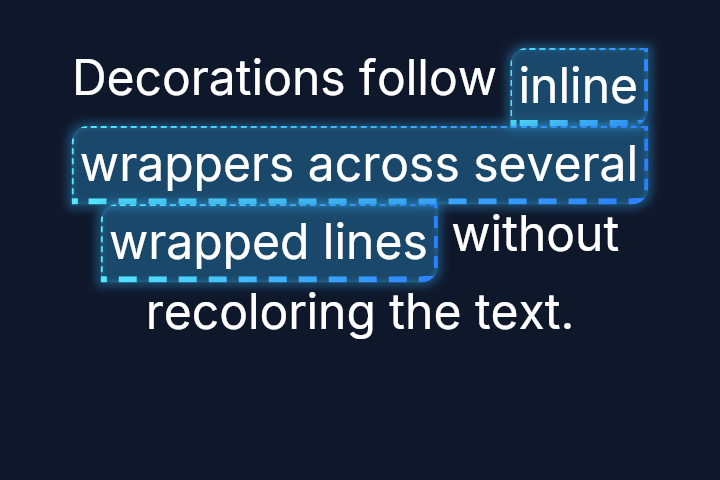
Inline paragraph wrappers
All border styles, independent edge widths/corner radii, shadows and glow work
on el(attrs, text(...)) inside a paragraph. Each wrapped line segment gets a
complete box with its own edges, corners, padding and shadow stack (clone-on-wrap).
Words on the same line share the box; adjacent wrappers remain separate.
Border width and padding reserve space and can change wrapping and line height.
Shadows and glow remain decorative, including when no visible border is set.
Outer shadows can bleed between lines and into padding; the existing active-axis
scroll clips still apply. Inset shadows are painted inside the rounded box,
behind the text. Explicit Background.color/1 fills paint over outer shadows
and under inset shadows/text: opaque colors hide the interior shadow while
transparency reveals it. No implicit background is painted. Borders are
painted after the text.
Background and border gradients span each line segment's outer box. Shadow gradients use that same casting box before offset, spread and blur. Both restart at a wrapped continuation, not at each word. Text gradients still span the paragraph.
This does not add inline background images, nested wrapper extraction or a new multiline hit-testing model. Floating elements retain ordinary box layout.
el(
  [width(fill()), height(fill()), padding(24), Background.color(color(:slate, 900))],
  paragraph([width(fill()), Font.size(24), Font.color(:white), center_x()], [
    text("Decorations follow "),
    el(
      [
        padding(3),
        Border.width_each(1, 2, 3, 1),
        Border.rounded_each(8, 0, 8, 0),
        Border.dashed(),
        Border.color(gradient([color(:cyan, 300), color(:blue, 500)])),
        Border.glow(color_rgba(43, 145, 203, 0.4), 2),
        Border.inner_shadow(size: 1, blur: 2, color: color_rgba(43, 145, 203, 0.4))
      ],
      text("inline wrappers across several wrapped lines")
    ),
    text(" without recoloring the text.")
  ])
)
Examples
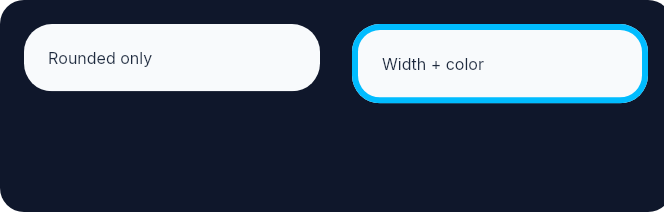
Rounded corners shape the element even before a visible border is added. Adding width and color then paints the border on that same outline.
row(
  [
    height(fill()),
    spacing(16),
    padding(12),
    Background.color(color(:slate, 900)),
    Border.rounded(12)
  ],
  [
    el(
      [
        width(px(148)),
        padding(12),
        Background.color(color(:slate, 50)),
        Font.color(color(:slate, 800)),
        Border.rounded(14)
      ],
      text("Rounded only")
    ),
    el(
      [
        width(px(148)),
        padding(12),
        Background.color(color(:slate, 50)),
        Border.rounded(14),
        Border.width(3),
        Border.color(color(:sky, 400)),
        Font.color(color(:slate, 800))
      ],
      text("Width + color")
    )
  ]
)
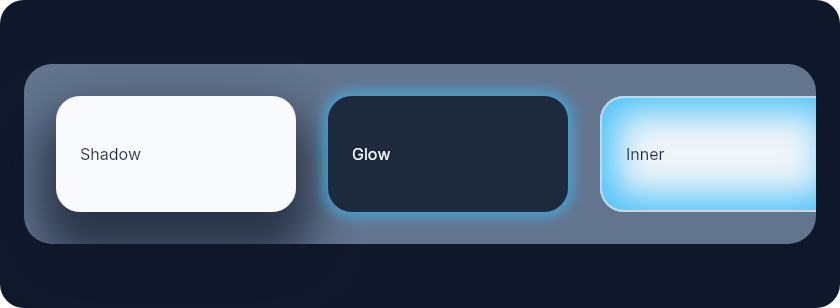
Shadows are easiest to understand side by side: outer shadow bleeds outward, glow is a zero-offset shadow, and inner shadow stays inside the element.
el(
  [
    width(fill()),
    height(fill()),
    padding(12),
    Background.color(color(:slate, 900)),
    Border.rounded(12),
    center_y()
  ],
  row(
    [
      width(fill()),
      padding(16),
      spacing(16),
      Background.color(color(:slate, 500)),
      Border.rounded(14)
    ],
    [
      el(
        [
          width(px(120)),
          height(px(58)),
          padding(12),
          Background.color(color(:slate, 50)),
          Border.rounded(12),
          Border.shadow(offset: {0, 16}, size: 8, blur: 24, color: color_rgba(15, 23, 42, 0.7)),
          center_y(),
          Font.color(color(:slate, 800))
        ],
        text("Shadow")
      ),
      el(
        [
          width(px(120)),
          height(px(58)),
          padding(12),
          Background.color(color(:slate, 800)),
          Border.rounded(12),
          Border.glow(color_rgba(56, 189, 248, 0.55), 3),
          center_y(),
          Font.color(color(:slate, 50))
        ],
        text("Glow")
      ),
      el(
        [
          width(px(120)),
          height(px(58)),
          padding(12),
          Background.color(color(:slate, 100)),
          Border.rounded(12),
          Border.width(1),
          Border.color(color(:slate, 300)),
          Border.inner_shadow(
            offset: {0, 0},
            size: 8,
            blur: 18,
            color: color_rgba(56, 189, 248, 0.9)
          ),
          center_y(),
          Font.color(color(:slate, 800))
        ],
        text("Inner")
      )
    ]
  )
)
Summary
Functions
Set border color
Dashed border style
Dotted border style
Add a uniform glow around the element.
Add an inner shadow (inset box shadow).
Round the element corners. This does not draw a visible border unless width and color are also set.
Round each element corner individually. This does not draw a visible border unless width and color are also set.
Add a box-shaped outer shadow, including behind the element's content.
Solid border style (default)
Set border width. Border width participates in layout and reduces the content area.
Set per-edge border widths (top, right, bottom, left). These widths participate in layout on their respective sides.
Types
@type color_value() :: Emerge.UI.Color.color() | Emerge.UI.Color.t()
@type shadow_options() :: keyword()
@type style() :: :solid | :dashed | :dotted
@type t() ::
  {:border_radius, radius()}
  | {:border_width, width_value()}
  | {:border_color, color_value()}
  | {:border_style, style()}
  | {:box_shadow, shadow_value()}
Functions
@spec color(color_value()) :: {:border_color, color_value()}
Set border color
@spec dashed() :: {:border_style, :dashed}
Dashed border style
@spec dotted() :: {:border_style, :dotted}
Dotted border style
@spec glow(color_value(), number()) :: {:box_shadow, shadow_value()}
Add a uniform glow around the element.
Sugar for shadow/1 with zero offset.
Decorative only. glow/2 follows the same bleed and scroll-axis clipping
behavior as outer shadows.
@spec inner_shadow(shadow_options()) :: {:box_shadow, shadow_value()}
Add an inner shadow (inset box shadow).
Same options as shadow/1 but rendered inside the element.
Decorative only. Inner shadows do not affect layout and stay inside the element.
Round the element corners. This does not draw a visible border unless width and color are also set.
Round each element corner individually. This does not draw a visible border unless width and color are also set.
@spec shadow(shadow_options()) :: {:box_shadow, shadow_value()}
Add a box-shaped outer shadow, including behind the element's content.
Transparent backgrounds reveal the shadow inside the box; opaque backgrounds painted over it provide occlusion. This is not a glyph-shaped text shadow.
Decorative only. Outer shadows do not affect layout.
Parent padding does not clip descendant rendering, so outer shadows can bleed into a parent's padding.
Scroll containers clip outer shadows only on active scroll axes.
Options:
:offset-{x, y}offset (default{0, 0}):size- spread size in pixels (default0):blur- blur radius in pixels (default10):color- shadow color (default:black)
@spec solid() :: {:border_style, :solid}
Solid border style (default)
@spec width(width_value()) :: {:border_width, width_value()}
Set border width. Border width participates in layout and reduces the content area.
@spec width_each(number(), number(), number(), number()) ::
  {:border_width, width_value()}
Set per-edge border widths (top, right, bottom, left). These widths participate in layout on their respective sides.