Overflow helpers for scrollable layouts.
Use scrollbar_y/0 and scrollbar_x/0 on a bounded container when its child
content may exceed the available space.
These helpers do not create layout on their own. They simply enable scrolling on the container you attach them to.
Behavior
scrollbar_y/0enables vertical scrolling when content is taller than the containerscrollbar_x/0enables horizontal scrolling when content is wider than the container- you can enable both axes on the same element
- scrollbars only appear when content actually overflows
Use scrolling on containers that already have a size constraint, such as a
fixed height(px(...)), a fixed width(px(...)), or a parent that gives the
element bounded fill() space.
Style the container normally with helpers such as Background.color/1,
Border.rounded/1, padding/1, and spacing/1.
Controlled scrolling
Bind scroll_y(state.y) (or scroll_x(state.x)) and
Emerge.UI.Event.on_scroll/1 to ordinary controller state. Callbacks carry
%{x: float, y: float}; store the relevant fraction unchanged. Fractions
describe the available scroll range, not total content size. Use float
endpoints 0.0 and 1.0; integers are keys, not fractions.
scroll_y(:selected_child) aligns a keyed descendant's layout-box top with
the padded scrollport's top, clamped to the range. Horizontal targets align
left edges. Targets cannot cross nearby mounts or another scrollport on the
same axis. Paint-only transforms do not affect this layout-box alignment.
Missing targets are one-shot no-ops, not promises to jump on a later render.
Native input owns the live position. Repeated declarations and timely callback echoes cannot rewind newer scrolling. App jumps do not emit callbacks. Resize preserves the live fraction, including across temporary zero overflow; disabling an axis resets its fraction to zero. Removing a position attribute releases control without moving.
Echo protection lasts five seconds. A reset equal to an outstanding echo is ambiguous; arbitrarily delayed/out-of-order controller results need a separate application-level causal protocol.
Examples
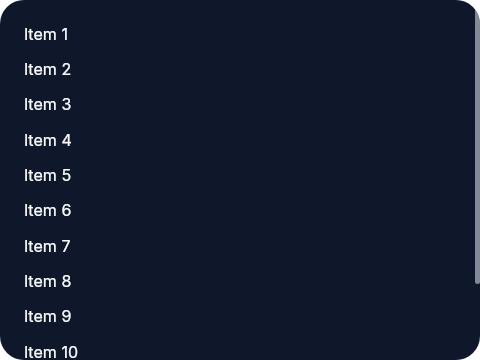
A vertical scroll panel:
The panel itself is fixed at 180px tall, so once the column grows past that
height the user can scroll through the list.
el(
  [
    width(px(240)),
    height(px(180)),
    padding(12),
    scrollbar_y(),
    Background.color(color(:slate, 900)),
    Border.rounded(12),
    Font.color(color(:slate, 50))
  ],
  column([spacing(8)], [
    text("Item 1"),
    text("Item 2"),
    text("Item 3"),
    text("Item 4"),
    text("Item 5"),
    text("Item 6"),
    text("Item 7"),
    text("Item 8"),
    text("Item 9"),
    text("Item 10"),
    text("Item 11"),
    text("Item 12")
  ])
)
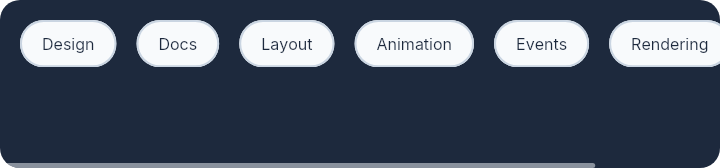
A horizontal chip row:
This keeps the chip row on one line and lets the user scroll sideways once the row becomes wider than the container.
el(
  [
    width(px(360)),
    height(px(84)),
    padding(10),
    scrollbar_x(),
    Background.color(color(:slate, 800)),
    Border.rounded(10)
  ],
  row([spacing(10)], [
    el(
      [
        padding_xy(10, 6),
        Background.color(color(:slate, 50)),
        Border.rounded(999),
        Border.width(1),
        Border.color(color(:slate, 300)),
        Font.color(color(:slate, 800))
      ],
      text("Design")
    ),
    el(
      [
        padding_xy(10, 6),
        Background.color(color(:slate, 50)),
        Border.rounded(999),
        Border.width(1),
        Border.color(color(:slate, 300)),
        Font.color(color(:slate, 800))
      ],
      text("Docs")
    ),
    el(
      [
        padding_xy(10, 6),
        Background.color(color(:slate, 50)),
        Border.rounded(999),
        Border.width(1),
        Border.color(color(:slate, 300)),
        Font.color(color(:slate, 800))
      ],
      text("Layout")
    ),
    el(
      [
        padding_xy(10, 6),
        Background.color(color(:slate, 50)),
        Border.rounded(999),
        Border.width(1),
        Border.color(color(:slate, 300)),
        Font.color(color(:slate, 800))
      ],
      text("Animation")
    ),
    el(
      [
        padding_xy(10, 6),
        Background.color(color(:slate, 50)),
        Border.rounded(999),
        Border.width(1),
        Border.color(color(:slate, 300)),
        Font.color(color(:slate, 800))
      ],
      text("Events")
    ),
    el(
      [
        padding_xy(10, 6),
        Background.color(color(:slate, 50)),
        Border.rounded(999),
        Border.width(1),
        Border.color(color(:slate, 300)),
        Font.color(color(:slate, 800))
      ],
      text("Rendering")
    ),
    el(
      [
        padding_xy(10, 6),
        Background.color(color(:slate, 50)),
        Border.rounded(999),
        Border.width(1),
        Border.color(color(:slate, 300)),
        Font.color(color(:slate, 800))
      ],
      text("Testing")
    )
  ])
)
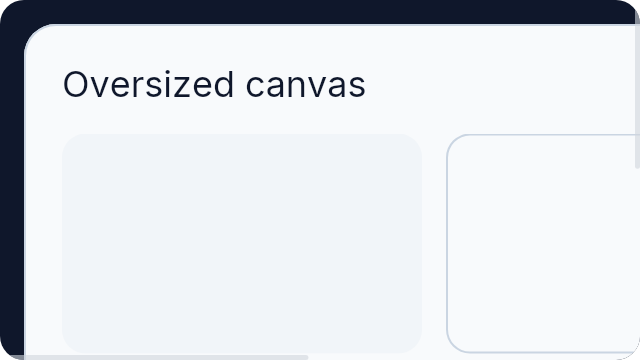
A panel that can scroll in both directions:
This is useful for oversized content such as previews, canvases, or debug surfaces that may exceed the container in both axes.
el(
  [
    width(px(320)),
    height(px(180)),
    padding(12),
    scrollbar_x(),
    scrollbar_y(),
    Background.color(color(:slate, 900)),
    Border.rounded(12)
  ],
  el(
    [
      width(px(640)),
      height(px(360)),
      padding(18),
      Background.color(color(:slate, 50)),
      Border.rounded(16),
      Border.width(1),
      Border.color(color(:slate, 300))
    ],
    column([spacing(14)], [
      el([Font.size(18), Font.color(color(:slate, 900))], text("Oversized canvas")),
      row([spacing(12)], [
        el(
          [
            width(px(180)),
            height(px(110)),
            Background.color(color(:slate, 100)),
            Border.rounded(12)
          ],
          none()
        ),
        el(
          [
            width(px(220)),
            height(px(110)),
            Background.color(color(:slate, 50)),
            Border.rounded(12),
            Border.width(1),
            Border.color(color(:slate, 300))
          ],
          none()
        )
      ]),
      row([spacing(12)], [
        el(
          [
            width(px(280)),
            height(px(140)),
            Background.color(color(:slate, 100)),
            Border.rounded(12)
          ],
          none()
        ),
        el(
          [
            width(px(240)),
            height(px(140)),
            Background.color(color(:slate, 50)),
            Border.rounded(12),
            Border.width(1),
            Border.color(color(:slate, 300))
          ],
          none()
        )
      ])
    ])
  )
)
Summary
Types
Scroll attribute returned by this module.
Functions
Set horizontal scroll progress (0.0 to 1.0) or align a keyed descendant's
left edge with this scrollport, clamped to its range. Requires scrollbar_x/0.
A repeated declaration does not override later user scrolling.
Set vertical scroll progress (0.0 to 1.0) or align a keyed descendant's top
with this scrollport, clamped to its range. Requires scrollbar_y/0.
Bind Emerge.UI.Event.on_scroll/1's %{x: x, y: y} fractions back through these helpers
for controlled scrolling. Geometry changes preserve the live fraction.
Key jumps apply once, not as a permanent anchor; missing targets are no-ops.
Enable horizontal scrolling when the child content is wider than the container.
Enable vertical scrolling when the child content is taller than the container.
Types
@type position() :: float() | Emerge.UI.key()
@type position_attr() :: {:scroll_position_x | :scroll_position_y, position()}
@type scrollbar_x_attr() :: {:scrollbar_x, true}
@type scrollbar_y_attr() :: {:scrollbar_y, true}
Scroll attribute returned by this module.
@type t() :: scrollbar_y_attr() | scrollbar_x_attr() | position_attr()
Functions
@spec scroll_x(position()) :: position_attr()
Set horizontal scroll progress (0.0 to 1.0) or align a keyed descendant's
left edge with this scrollport, clamped to its range. Requires scrollbar_x/0.
A repeated declaration does not override later user scrolling.
@spec scroll_y(position()) :: position_attr()
Set vertical scroll progress (0.0 to 1.0) or align a keyed descendant's top
with this scrollport, clamped to its range. Requires scrollbar_y/0.
Bind Emerge.UI.Event.on_scroll/1's %{x: x, y: y} fractions back through these helpers
for controlled scrolling. Geometry changes preserve the live fraction.
Key jumps apply once, not as a permanent anchor; missing targets are no-ops.
@spec scrollbar_x() :: scrollbar_x_attr()
Enable horizontal scrolling when the child content is wider than the container.
Use this on fixed-height containers whose child is a wide row/2.
Example
Here the container is short and the row can keep growing horizontally without wrapping, so the user scrolls left and right to see the rest.
el(
  [
    height(px(84)),
    padding(10),
    scrollbar_x(),
    Background.color(color(:slate, 100)),
    Border.rounded(10)
  ],
  row([spacing(10)], [
    text("Alpha"),
    text("Beta"),
    text("Gamma"),
    text("Delta")
  ])
)@spec scrollbar_y() :: scrollbar_y_attr()
Enable vertical scrolling when the child content is taller than the container.
Use this on fixed-height or fill-height panels whose child is a long
column/2.
Example
Here the panel height is bounded, so the log can grow while remaining usable inside a fixed area.
el(
  [
    height(px(220)),
    padding(12),
    scrollbar_y(),
    Background.color(color(:slate, 900)),
    Border.rounded(12)
  ],
  column([spacing(8)], [
    text("Log line 1"),
    text("Log line 2"),
    text("Log line 3")
  ])
)