Background styling attributes.
Backgrounds are decorative. They paint behind an element's content but do not affect layout, sizing, or child measurement.
Use:
color/1for solid fills or linear gradients fromEmerge.UI.Color.gradient/2image/1andimage/2for background images
Inline paragraph wrappers
color/1 also paints inline el(attrs, text(...)) wrappers in paragraphs,
including solid, translucent and gradient fills. Each wrapped line segment
gets its own background, clipped to its border radius, behind text and inset
shadows but over outer shadows/glow. Opaque black hides the interior shadow;
a transparent fill reveals it.
Backgrounds are not inherited. A wrapper without an explicit color background emits no background draw, whether or not it has a shadow. Inline background images are not supported.
Background Images
Background.image/2 decorates an existing element frame. It does not create
an image element and it does not derive size from the source image. Use
Emerge.UI.image/2 when the image itself is the content element.
Background image fit modes are:
:cover- fill the frame and crop if needed:contain- fit entirely inside the frame without cropping:repeat- tile on both axes:repeat_x- tile on the X axis only:repeat_y- tile on the Y axis only
Emerge.UI.image_fit/1 only applies to Emerge.UI.image/2 and only accepts
:contain and :cover. Background images additionally support the repeat
modes above.
Backgrounds follow the element shape, so rounded corners from
Emerge.UI.Border.rounded/1 and Emerge.UI.Border.rounded_each/4 also clip
background painting.
For color helpers, see Emerge.UI.Color. Background.image/2 accepts the
same source forms as Emerge.UI.image/2.
Examples
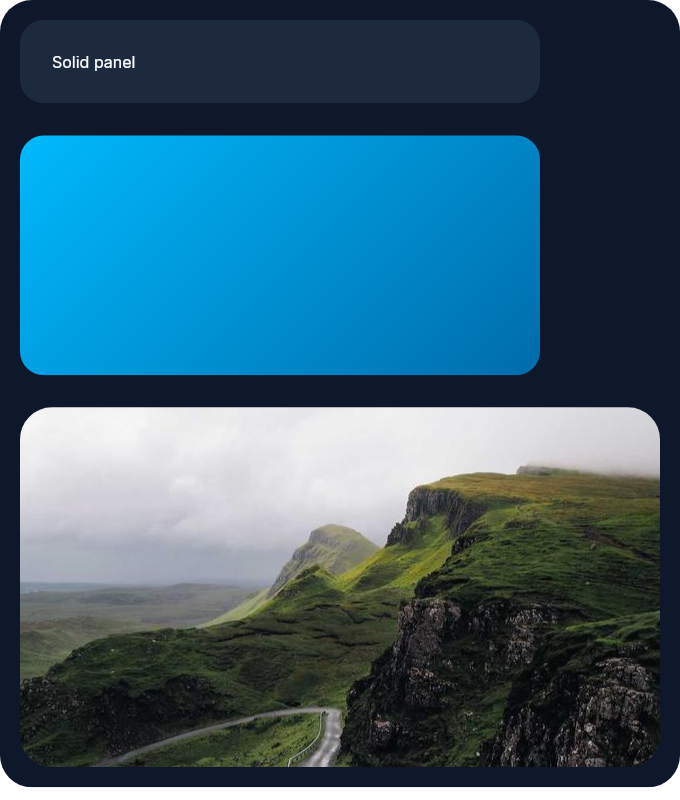
This column shows the three main background styles side by side: a solid panel, a decorative gradient block, and an image-backed hero surface.
column(
  [
    padding(10),
    spacing(16),
    Background.color(color(:slate, 900)),
    Border.rounded(16)
  ],
  [
    el(
      [
        width(px(260)),
        padding(16),
        Background.color(color(:slate, 800)),
        Border.rounded(12),
        Font.color(color(:slate, 50))
      ],
      text("Solid panel")
    ),
    el(
      [
        width(px(260)),
        height(px(120)),
        Background.color(Emerge.UI.Color.gradient([color(:sky, 400), color(:sky, 700)], 45)),
        Border.rounded(12)
      ],
      none()
    ),
    el(
      [
        width(px(320)),
        height(px(180)),
        Background.image("sample_assets/static.jpg"),
        Border.rounded(16)
      ],
      none()
    )
  ]
)
Rendered result:
Summary
Functions
Set a solid or gradient background color.
Set a background image on the element frame.
Tile a background image on both axes.
Tile a background image on the X axis.
Tile a background image on the Y axis.
Set a background image that fits without cropping.
Types
@type color_value() :: Emerge.UI.Color.color() | Emerge.UI.Color.t()
@type fit() :: :contain | :cover | :repeat | :repeat_x | :repeat_y
@type image_background() :: {:image, Emerge.UI.image_source(), fit()}
@type image_options() :: keyword()
@type t() :: {:background, color_value() | image_background()}
Functions
@spec color(color_value()) :: t()
Set a solid or gradient background color.
Accepts plain named colors like :black and normalized color tuples from
Emerge.UI.Color, including Emerge.UI.Color.gradient/2.
Background.color(gradient([color(:sky, 400), color(:violet, 500)], 30))Example
This creates a small status pill with a solid green fill and white text.
el(
  [
    padding(12),
    Background.color(color(:emerald, 600)),
    Border.rounded(8),
    Font.color(color(:white))
  ],
  text("Saved")
)@spec image(Emerge.UI.image_source(), image_options()) :: t()
Set a background image on the element frame.
Accepts any source supported by Emerge.UI.image_source(). The default fit is
:cover.
Unlike Emerge.UI.image/2, this is decorative and does not create a content
image element. Background images also support tiling via :repeat,
:repeat_x, and :repeat_y.
Example
This shows the difference between the default :cover behavior and an
uncropped :contain background image.
column([spacing(12)], [
  el(
    [
      width(px(320)),
      height(px(180)),
      Background.image("images/hero.jpg"),
      Border.rounded(16)
    ],
    none()
  ),
  el(
    [
      width(px(320)),
      height(px(120)),
      Background.image("images/logo.png", fit: :contain),
      Border.rounded(16)
    ],
    none()
  )
])@spec tiled(Emerge.UI.image_source()) :: t()
Tile a background image on both axes.
Sugar for image(source, fit: :repeat).
Example
This repeats a small pattern image in both directions to create a textured surface.
el(
  [
    width(px(240)),
    height(px(120)),
    Background.tiled("images/pattern.svg"),
    Border.rounded(12)
  ],
  none()
)@spec tiled_x(Emerge.UI.image_source()) :: t()
Tile a background image on the X axis.
Sugar for image(source, fit: :repeat_x).
Example
This repeats a decorative pattern across the width while keeping the height bounded by the host element.
el(
  [
    width(px(240)),
    height(px(80)),
    Background.tiled_x("images/pattern.svg"),
    Border.rounded(12)
  ],
  none()
)@spec tiled_y(Emerge.UI.image_source()) :: t()
Tile a background image on the Y axis.
Sugar for image(source, fit: :repeat_y).
Example
This repeats a decorative pattern down the height while keeping the width bounded by the host element.
el(
  [
    width(px(120)),
    height(px(200)),
    Background.tiled_y("images/pattern.svg"),
    Border.rounded(12)
  ],
  none()
)@spec uncropped(Emerge.UI.image_source()) :: t()
Set a background image that fits without cropping.
Sugar for image(source, fit: :contain).
Example
This is useful for logos or illustrations that should remain fully visible inside the frame.
el(
  [
    width(px(220)),
    height(px(120)),
    Background.uncropped("images/logo.png"),
    Border.rounded(12)
  ],
  none()
)